Extracting specific labels for registration
Following the recommendations from the previous page, we can use sct_label_utils to create a new label image containing just two labels for registration.
Primary workflow (disc labels from sct_deepseg spine)
sct_label_utils -i t2_totalspineseg_discs.nii.gz -keep 3,9 -o t2_labels_vert.nii.gz
- Input arguments:
-i: Input label image. Here, we use disc labels generated by spine.-keep: Label values to keep from the input image. Here,3,9keeps C2/C3 and T1/T2 disc labels.-o: Output filename.
- Output files/folders:
t2_labels_vert.nii.gz: Image containing the selected labels for registration.
Legacy workflow (labels from sct_label_vertebrae)
If you already have a labeled segmentation produced by sct_label_vertebrae, you can apply a similar extraction strategy:
sct_label_utils -i t2_seg_labeled.nii.gz -vert-body 3,9 -o t2_labels_vert.nii.gz
This command uses -vert-body to extract point labels from the vertebral body labels produced by sct_label_vertebrae.
Once the command has finished, if you have fsleyes installed, at the bottom of your terminal there will be instructions for inspecting the results using FSLeyes. However, because the output labels are single-voxel, you may need to use zoom to see them clearly in FSLeyes.
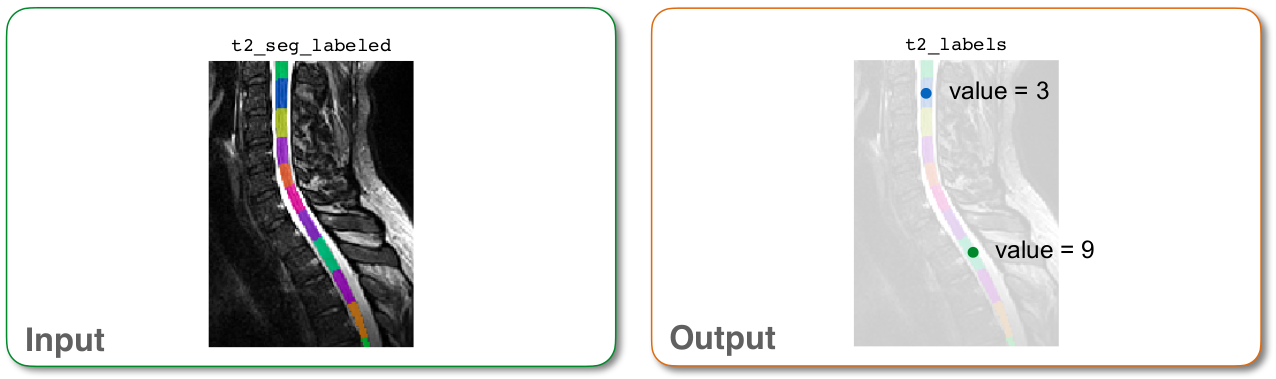
Input/output images for sct_label_utils