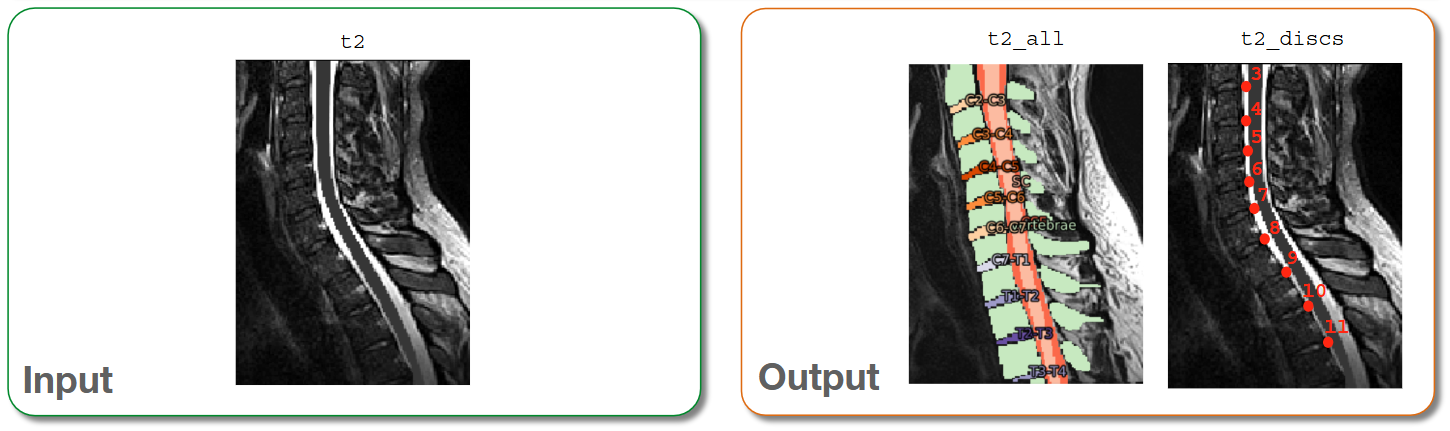
Applying the labeling algorithm
The recommended workflow for vertebral and disc labeling is now based on spine, which uses TotalSpineSeg to generate disc labels (and optionally a full multi-class spine segmentation).
For most subsequent commands in this tutorial series (for example, template registration and per-level CSA with -discfile), the main required output is the disc label file.
Disc labeling for registration and per-level metrics
sct_deepseg spine -i t2.nii.gz -qc ~/qc_singleSubj
- Input arguments:
-i: Input image-qc: Directory for Quality Control reporting. QC reports allow us to evaluate the results slice-by-slice.
- Output files/folders:
t2_totalspineseg_discs.nii.gz: Single-voxel intervertebral disc labels for subsequent registration and metric extraction steps.
Once the command has finished, at the bottom of your terminal there will be instructions for inspecting the results using Quality Control (QC) reports. Optionally, If you have FSLeyes installed, a fsleyes command will printed as well.
Optional: full multi-class spine segmentation
If you also want vertebrae/canal/cord outputs from TotalSpineSeg, run spine with -label-vert 1.
sct_deepseg spine -i t2.nii.gz -label-vert 1 -qc ~/qc_singleSubj
fsleyes t2.nii.gz -cm greyscale t2_totalspineseg_discs.nii.gz -cm subcortical -a 70.0 t2_totalspineseg_all.nii.gz -cm subcortical -a 70.0 &
- Input arguments:
-i: Input image.-label-vert: Set to1to output full spine segmentation (e.g. vertebrae, cord, canal).-qc: Directory for Quality Control reporting.
- Output files/folders:
t2_step1_canal.nii.gz: Spinal canal segmentation.t2_step1_cord.nii.gz: Spinal cord segmentation.t2_totalspineseg_discs.nii.gz: Intervertebral disc labels.t2_step1_output.nii.gz: Vertebrae segmentation (intermediate output).t2_step2_output.nii.gz: Refined vertebrae segmentation (intermediate output).t2_totalspineseg_all.nii.gz: Combined TotalSpineSeg output.
This model can be slow on large volumes. Processing time can often be reduced by cropping the image before running the command and/or by using a GPU.